Highlights
- Four vision services, ML and classical CV together, running in lockstep on embedded hardware with zero stale or dropped detections.
- The core tradeoff: raw frame rate vs. a hard guarantee that every frame gets a complete, up-to-date set of detections, and what enforcing that guarantee costs architecturally.
- 25+ FPS on Jetson-class hardware, running all four detection services to completion on every single frame with zero corners cut on accuracy.
Stack: C++, PThreads, OpenMP, TensorRT, YOLO11n, Jetson Orin Nano 4GB.
Overview · How it works · My Contributions
Overview
This project is an Automated Driver Assistance System (ADAS) and one of my favorite projects to date: it was technically challenging, a collaborative build with a tight-knit team of 4, and it touches Machine Learning, traditional Computer Vision, edge computing, and systems design all at once.
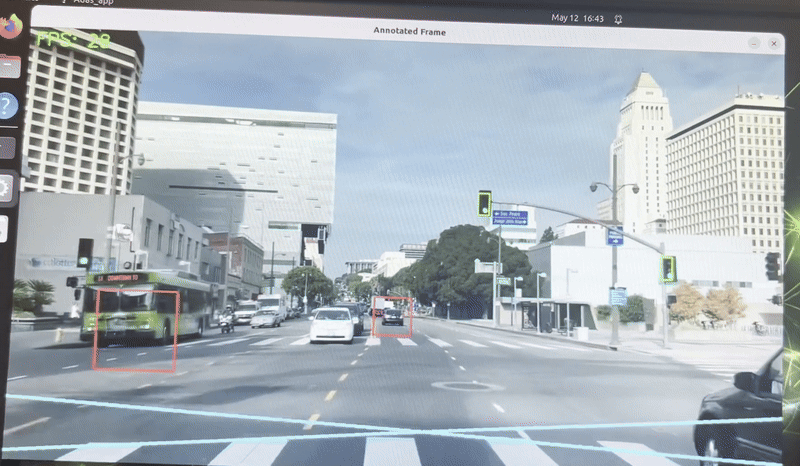
My team and I run 4 detection services (2 ML-based, 2 traditional CV) at 25+ frames per second, detecting traffic lights, pedestrians, lane lines, and cars from a live video or camera feed, and drawing the annotations back onto the frame in real time.
 Annotation color key: green - traffic lights, dark blue - pedestrians, light blue - lane lines, orange - cars.
One of the hardest calls on this project wasn't technical, it was a design priority. Do you tune the system for maximum FPS, or for the most accurate, complete annotations you can get while still hitting a usable frame rate? A driver-assistance system that occasionally misses a pedestrian, or shows a traffic light detection that's a few frames stale, isn't a system you can trust. So early on we set a hard requirement for ourselves: every frame gets a detection from every service, and no service is allowed to fall behind or serve stale results, all while still hitting a usable frame rate on Jetson-class hardware.
That requirement ruled out a few tempting alternatives:
- Frame skipping / sampling - running slower services (like the ML detectors) on every second or third frame and interpolating in between. Easier to hit a high frame rate, but a pedestrian or traffic light could go undetected for several frames, unacceptable for a safety-relevant system.
- Asynchronous / eventual consistency - letting each service run at its own pace and drawing whatever annotations happen to be available, even from an older frame. More decoupled and forgiving of a slow detector, but annotations can drift out of sync with the frame actually on screen, which we didn't want for a driver-facing overlay.
- Best-effort / priority scheduling - always drawing critical detections (traffic lights, pedestrians) and dropping lower-priority ones (lane lines, cars) under load. Keeps FPS up under stress, but sacrifices completeness exactly when the system is most taxed. We didn't end up needing this tradeoff either: thread affinity and GPU offload (detailed below) gave us enough parallel headroom to run every service to completion on every frame.
That priority also shaped the build order. We got every detection service correct and running to completion on every frame first, before optimizing for speed at all. Only after that baseline worked did we turn to GPU acceleration, thread-core affinity, and compiler-level optimizations, bringing FPS from a baseline of ~6 up to 25+. That sequencing was a real risk: if those optimizations hadn't clawed back enough performance, we would have had a correct system that was too slow to demo, with no time left before the deadline to rearchitect it.
How it works
The system is built around barrier-synchronized shared memory. Independent services read frames from a shared buffer and write their results to dedicated annotation buffers rather than talking to each other directly, and a hard barrier gates every stage of the pipeline each frame.
There are three core service types:
- ReadFrame - reads frames from the video/camera source and writes them to a shared frame buffer.
- ServiceWrapper - wraps each detection service (traffic lights, pedestrians, lane lines, cars), reads a frame from the buffer, runs its assigned model or algorithm, and writes results to a dedicated annotations buffer.
- DrawFrame - collects annotations from every service, draws them on the frame, and renders the output to the GUI.
Synchronization between these services is handled with two 8-bit atomic flags, FrameReady and ProcessingFinished.
Each service is assigned a unique bit at startup:
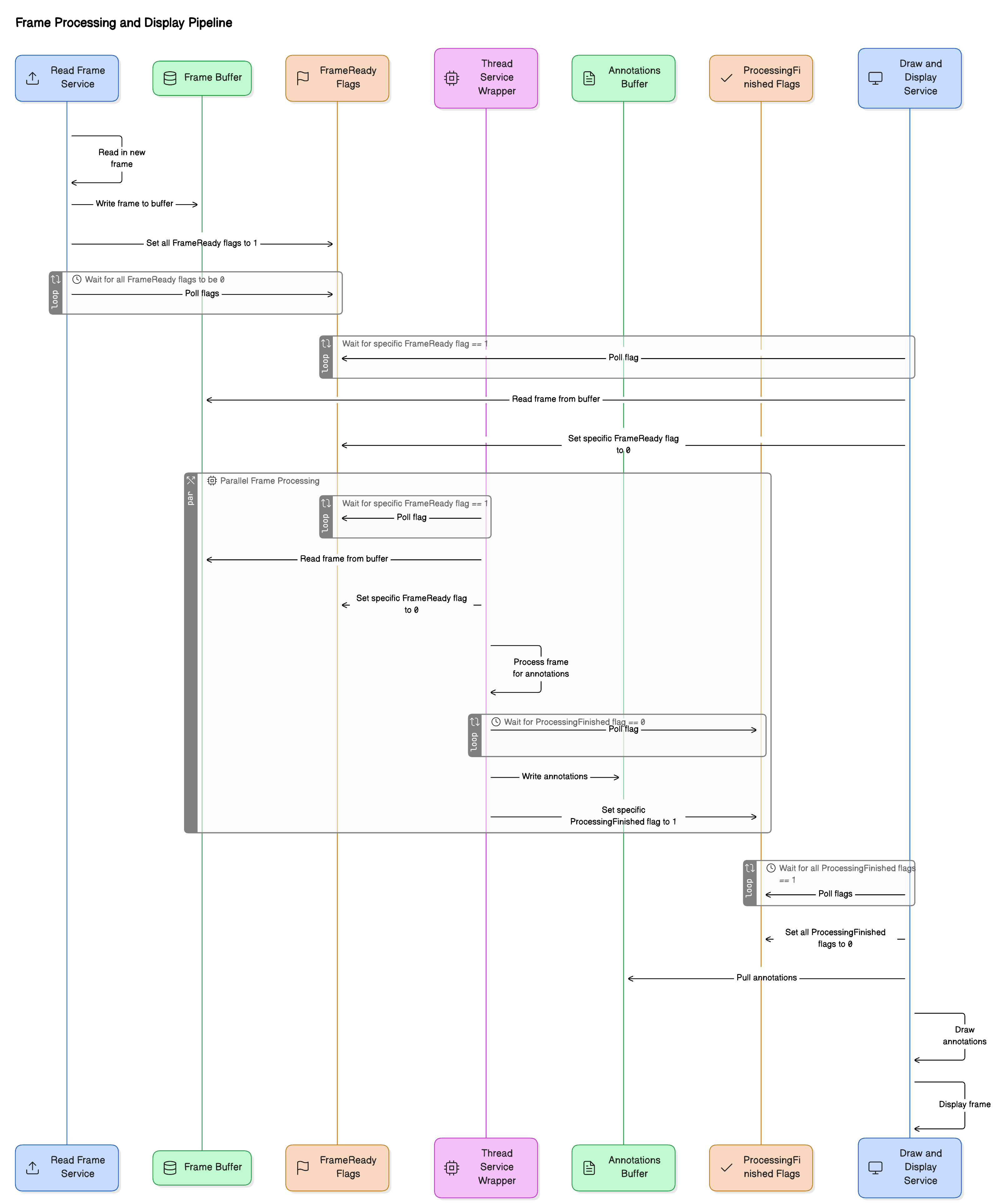
- ReadFrame sets all bits in
FrameReadyonce a new frame is written, then waits for all bits to clear before writing the next one. - Each ServiceWrapper polls its bit in
FrameReady, processes the frame once it's set, clears its bit, then sets its bit inProcessingFinishedwhen its annotations are ready. - DrawFrame waits for all bits in
ProcessingFinishedto be set, then pulls annotations from every buffer and renders the composite frame.
This is a barrier synchronization pattern: every service must reach the same point (frame read, then all detections finished) before the pipeline advances. It trades some coupling for tight, predictable per-frame timing, a fit for the fixed, known set of detection services this system runs.
Video is captured and drawn at 1024p, a standard resolution chosen to balance visual quality against the amount of data moving through the pipeline every frame. Each YOLO model, however, resizes its own copy of the frame down to a fixed 640x640 for inference, then scales its detections back up to 1024p coordinates before handing them off to DrawFrame, keeping the heavier ML step cheap without sacrificing the resolution of the final annotated output.
To hit the performance target on top of this, the system:
- Threads each service individually with PThreads, pinning threads via core affinity.
- Applies compile-time optimizations with OpenMP.
- Runs the YOLO models through TensorRT, optimized specifically for the Jetson hardware.
My Contributions
I worked on the core system architecture (frame reading and drawing), the multi-service synchronization framework, and the traffic light detection service. The traffic light model is a fine-tuned YOLO11n, trained on the LISA Traffic Lights dataset and further tuned on the Bosch Small Traffic Lights dataset.
Drafted with AI assistance from the project's repo, reviewed and edited by me.